Storing access keys is an integral part of development. Secure key storage becomes critical with multiple environments such as staging, development, and production. Specifically for WordPress, the key concerns are not disclosing keys in version control and securing the wp-config.php file.
While there are multiple ways to do this, key storage becomes simple with DotEnv using Composer. In this post, we’ll take a look at the uses of DotEnv using Composer in WordPress.
Let’s begin by installing the vlucas/phpdotenv package using Composer.
Step 1
WordPress commonly exists in the htdocs folder in a local environment (using XAMPP or MAMP). Switch to this directory or the root directory where WordPress exists. Enter the following commands,
with basic arguments such as the name and description,
Composer init
The above command creates the composer.json file in the root directory.
You can also create the composer.json file as shown below,
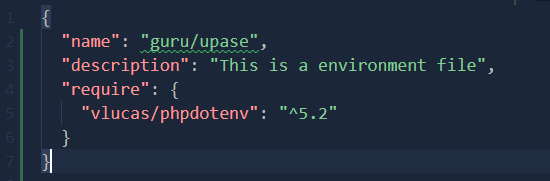
Note: We’ve installed the latest version, 5.2, of vlucas/phpdotenv.
Step 2
After creating a composer.json file, enter the following command,
composer install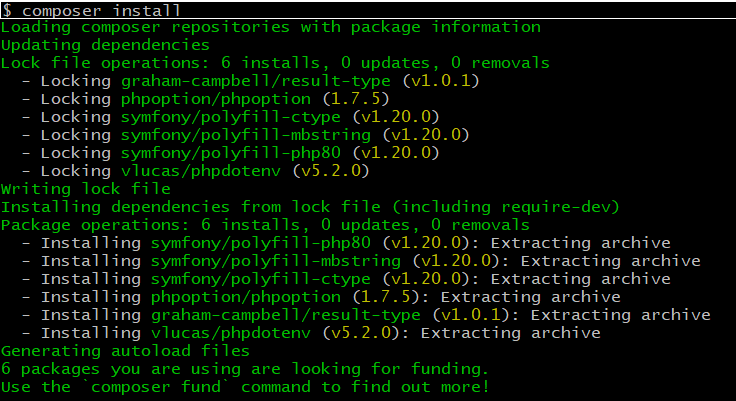
This command creates the vendor directory with the required packages and their dependencies.
Step 3
Now let us create the .env file as below in the WordPress root directory (in my case, it is in the ‘htdocs’ folder) with secret keys or variables needed for the project.
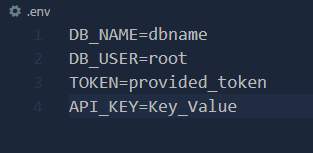
We are now nearing the finish line.
Step 4
Each time you wish to use DotEnv environment variables, you can add the following code at the beginning of the file.

For example, if you wish to use these environment variables in the WordPress wp-config.php file, then you should add the above code to the top of the file as follows,
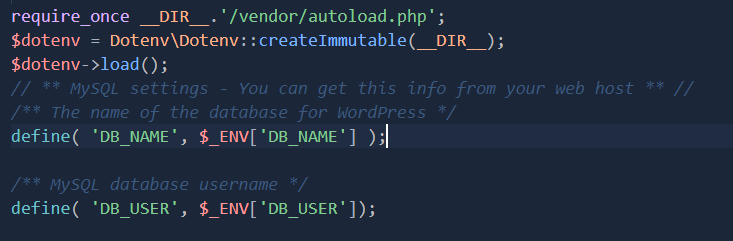
You can access the environment variables DB_NAME using $_ENV[‘DB_NAME’] in any PHP file in the above code.
Step 5
This is the last step where the .env file is added to your .gitignore file. This addition prevents disclosure in the repository or version control.